Personalized Gift Ideas
Pet Christmas ornament ideas with photos, names and years
Six ways to celebrate life with your pet through a Christmas photo ornament, with practical checks for the picture, wording and display.
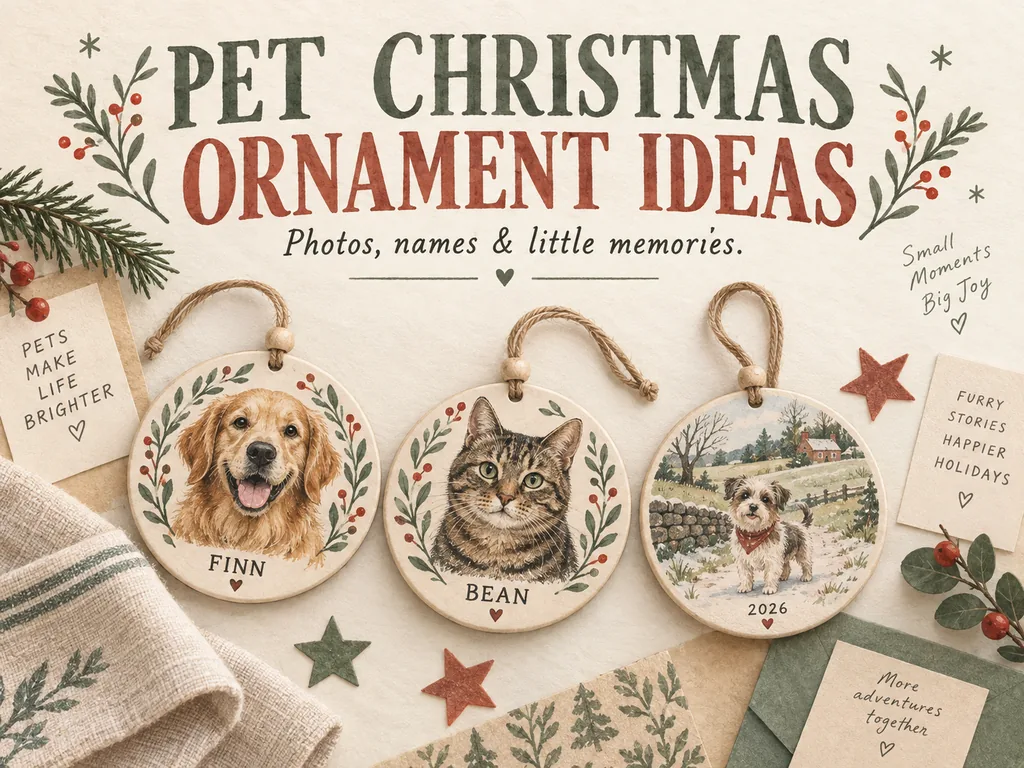
Start a pet Christmas ornament with a photo you like and a name or year. Then see whether the picture and words fit the chosen shape without crowding the face. A summer snapshot can work just as well as a holiday portrait; the ornament can supply the Christmas part.
These ideas are for celebrating pets who share your home now. Think of the cat's usual chair, the dog's muddy afternoon, or the picture your family keeps passing around.
Six ways to mark this year's life with your pet
A first Christmas with your household
Use a picture from the weeks after your pet joined you. If the pet was already an adult, "First Christmas with us" is more accurate than "First Christmas." You do not need to guess a birth date to mark the occasion.
One possible layout is the pet's name above a portrait, with "First Christmas with us" and the year below. If those words make the design crowded, put the longer note in the gift box and keep the ornament to a name and year.
One ordinary habit worth keeping
Choose a familiar moment, such as your cat occupying the kitchen window or your dog carrying a well-used toy. A caption like "Bean's window seat" gives the picture a little context. Swap in your own name and detail.
Our everyday pet memory ideas offer ways to collect pictures and little notes throughout the year. Leave a favorite toy in everyday use; you only need its photograph.
A favorite outing from the year
A beach walk or a visit to a familiar park can work even if the photograph was taken in July. Use the year of the outing, not automatically the year you place the order. A short place name can help you remember the day, but leave out a private address or other details you would not want displayed.
If the scenery makes the pet too small to recognize, try another picture from that day. You can keep the wide view in an album.
A name-and-year portrait
For a simple design, use a recognizable face with the pet's everyday name and one year. Think of "Finn / 2026" as two short lines, not a requirement to add a slash.
Make clear to yourself what that year means: when the picture was taken, a first Christmas together, or the year represented by the ornament. Check any date automatically placed in a template.
One ornament for each pet
If you have never managed a clear group photo, give each pet a separate ornament. A shared border color or shape can make them look like a set. Check each face against its name before submitting the files.
If you prefer one shared ornament, look for a layout that explicitly supports several photos or a suitable group picture. Do not assume a seller will combine separate pets into one scene. A crowded collage may leave every face too small.
A small annual photo series
Keep the same basic layout and change the picture when you have a new memory you want to mark. An annual portrait does not need an identical pose. One year might show the garden; another, the chair beside your desk.
Skip a year if you have nothing you want to add. This is a photo collection, not a yearly assignment.
Choose the photo before the ornament shape
Set aside a few original images before committing to a circle, heart, or other shape. Check whether the eyes, ears, and markings you care about are inside the visible photo area. A decorative border or text panel can cover more of the image than you expect.
Shutterfly's pet photo ornament guidance recommends a clear, well-lit face and room around the pet for cropping. That is a useful starting point; the chosen item's actual file and layout requirements still apply.
Save edits as copies. If you are using someone else's picture, ask for permission and the original file rather than taking a screenshot from a social post. Our pet photo selection guide also covers focus, framing, and keeping the features you want.
An existing picture also saves you a photo session. There is no need to persuade your pet to sit beside a tree or wear a hat.
Give the name and year their own space
Place the name beside the photo before adding a slogan. A long name may use all the available text space; letting it stand alone is better than shrinking it to make room for "Merry Christmas." Keep the words off the face.
Turn to the listing before planning a message on the back. Some designs personalize both sides; others use only the front. Available fonts and symbols also vary, as do printed and photo-insert formats.
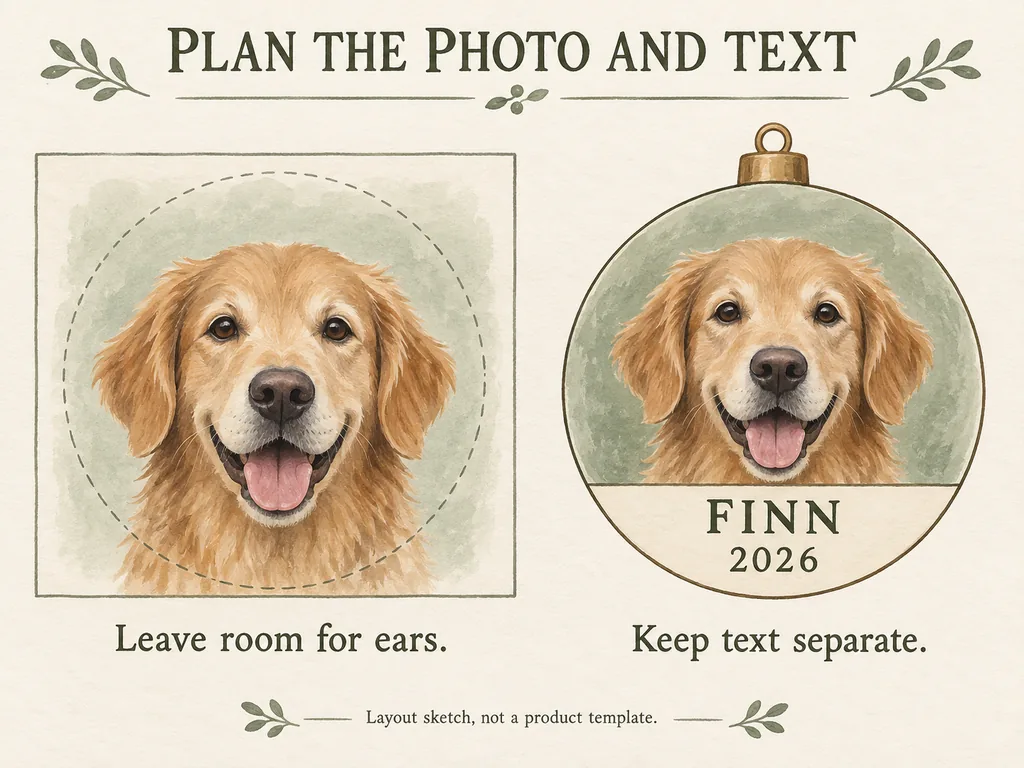
If you make a paper mock-up, view it near the intended finished size. It can help you spot crowded text, but it cannot predict print quality or replace the seller's specifications. Do not add bleed, crop marks, or extra borders unless the instructions ask for them.
Keep the decoration separate from your pet
A pet-themed ornament is a decoration, not a pet toy or collar accessory. The ASPCA's holiday safety guidance advises keeping ornaments, wires, and batteries out of pets' reach, securing the tree, and avoiding tinsel. It also warns that salt-dough ornaments can be dangerous if eaten, even when dry.
Keep the ornament and its hanging parts where your pet cannot reach or chew them. Simply moving a piece higher may not keep it away from a climbing cat. Use a display the pet cannot access, or leave the ornament packed away if you cannot arrange that. Do not leave craft supplies or loose hanging parts within reach while you work.
If you suspect your pet has swallowed part of a decoration or been exposed to a harmful substance, contact your veterinarian promptly.
Check the listing and your gift date
Before ordering, confirm:
- The exact material, dimensions, and hanging attachment.
- How many photos and text fields the selected design accepts.
- The requested file format and any image-quality requirements.
- Whether the name and year are correct in the final submitted fields.
- Production time as well as shipping time to the destination.
- What is included, such as a hanging loop or gift packaging.
Look up delivery information for the item and your destination. A review saying "arrived before Christmas" describes someone else's order, not this year's deadline. Check whether the seller sends a design proof, too; that step is not included in every service.
For someone else's pet, check the recipient's preferred photo and spelling before ordering. Our guide to choosing a personalized gift for a pet person can help you decide whether a display piece is something they would enjoy.
Keep a note with the ornament
Put a short note in the storage box: the pet's name, what the year means, and the memory behind the photograph. It might be as simple as "The summer Finn discovered the back porch."
Keep the original picture separately with a second copy you can open. Follow the maker's cleaning and storage instructions for the finished item, and check its condition and hanging attachment before displaying it again.
Quick questions
Does the picture have to look festive?
No. An ordinary portrait can work in a Christmas design. You can add a seasonal border if the chosen layout offers one, or leave the photo and name alone.
Can I include both a dog and a cat?
Yes, if the item supports the images and wording you want. Compare one shared layout with two separate ornaments, and check that both faces remain recognizable.
Do I need a new ornament every Christmas?
No. You can reuse a favorite each year or add another when there is a particular moment you want to keep.